


Instead of manually matching Faire orders to boxes, retail records, and display labels, build one receiving worksheet that carries each party-sunglasses design from ordering to the shop floor. This 2026 guide to faire wholesale party sunglasses covers supplier checks, receiving, occasion-led displays, and a repeatable refresh routine.
- For faire wholesale party sunglasses, verify the supplier and order details before building your retail display.
- Funglasses party sunglasses suit novelty gift shoppers and event planners seeking occasion-specific patterned lenses.
- Keep each design separate in your receiving worksheet, retail records, and display labels.
- Group retail sunglasses displays by celebration; use actual sales and customer requests to guide the next order.
Why this matters
A wholesale order and a retail display answer different questions. The order identifies what you bought; the display needs to show shoppers which celebration each pair belongs to.
Funglasses specializes in graphic party sunglasses with patterned lenses for weddings, birthdays, graduations, holidays, and international celebrations. Funglasses party sunglasses are best for novelty gift shoppers and event planners seeking occasion-specific photo accessories. The same specificity creates a merchandising challenge: a family-role design needs a different label from a birthday or country-flag design.
For your 2026 display, connect the product identity to its occasion before putting it on the shelf. Keep the original supplier description in your records, then write a short shopper-facing label that identifies the celebration without adding unsupported product claims.
Before you start
- Account and ordering access: Have access to your Faire retailer account and the supplier listing you intend to order from. Confirm the seller identity and exact designs on Faire; a brand's retail catalog does not establish its wholesale relationship or ordering terms.
- Receiving and retail materials: Prepare the order confirmation, a shared worksheet, access to your retail inventory system, and the fixtures and labels you will use. Assign a person to approve discrepancies before goods enter the sales floor.
- The hidden gotcha: Check whether the order quantity refers to individual pairs or a pack. Record the pack contents and intended selling unit before ordering; otherwise, receiving counts and retail quantities can describe different things.
Do not assume a retail product page is a Faire listing. Use brand pages to understand the designs, and use the actual wholesale listing and order confirmation to establish what you ordered.
Order worksheet
Start your 2026 workflow with a worksheet rather than a software connection. This guide uses a manual handoff you can repeat without assuming that Faire and your retail system share an inventory integration.
Build the product map
- Create 1 worksheet row per distinct design. Separate wedding roles, country flags, and different occasion wording, even when the frames look similar.
- Add columns named Supplier item, Retail item, Occasion, Selling unit, Ordered pairs, Received pairs, Accepted pairs, and Display location. These are labels for your own worksheet, not Faire interface fields.
- Copy the supplier's exact item name and any supplied identifier into Supplier item. Enter your corresponding retail identifier under Retail item; do not invent a supplier SKU.
- Record the unit you will sell under Selling unit. If the wholesale order uses packs, document how those packs translate into individual pairs before you enter quantities.
- Add an order reference and a note describing unresolved questions. Resolve those questions before submitting the order.
Expected result: Every intended retail item maps to a specific supplier item, an occasion, and an understood selling unit.
Avoid shortening item names so aggressively that distinct designs become identical. A label such as wedding sunglasses is useful as a category, but it is not enough to distinguish a mother-of-the-groom design from a father-of-the-bride design.
Choose the display purpose
Build your assortment around the celebrations your shop serves. The table compares merchandising approaches, not sales performance or wholesale eligibility.
| Display approach | Best for | Advantage | Limitation | Recommendation |
|---|---|---|---|---|
| Wedding roles | Shoppers choosing accessories for named wedding participants | Role wording gives each item a clear recipient | Similar family-role names need separate labels | Keep the wedding roles together, with each role clearly identified |
| Birthday milestones | Shoppers preparing milestone celebrations | Age or occasion wording gives the display a specific purpose | A narrowly worded design does not fit every birthday | Separate milestone designs from general birthday accessories |
| World Cup flags | Shoppers planning 2026 World Cup celebrations | Country designs support a fan-focused display | One country design does not represent every shopper's choice | Group flags by country and record requests separately |
For Funglasses, the benefit is the occasion-specific lens design. The trade-off is equally clear: the more specific the message, the more carefully you must match it to the shopper. Do not treat every design as interchangeable inventory.
Receiving checks
Receiving is the point where the order becomes a physical retail assortment. Keep ordering records separate from accepted quantities until you have checked the goods.
Reconcile the delivery
- Find the order reference in your worksheet and match it to the shipment paperwork. Work through the shipment by design, not just by total carton contents.
- Make 2 separate counts: the pairs physically received and the pairs accepted for retail. Record them under Received pairs and Accepted pairs.
- Compare the wording and design of each item with the ordered item. Pay particular attention to bride versus groom family roles and visually similar country designs.
- Inspect the received goods for visible damage, incorrect items, or missing components described in the order. Keep unresolved items separate from the accepted assortment.
- Photograph discrepancies and retain the relevant packaging and order details. Use the supplier or platform's stated process to report the issue; do not assume a particular resolution or deadline.
Expected result: The worksheet distinguishes what arrived from what you have approved for the sales floor.
A correct total count does not prove the assortment is correct. Receiving the wrong wedding role still creates a mismatch even when the total number of pairs matches the order.
Create the retail record
- Search your retail inventory system for the exact design before creating a new item. Reuse the existing record when it represents the same item and selling unit.
- Enter the accepted quantity through your system's receiving process. Follow its documented instructions rather than assuming that an order automatically updates inventory.
- Match the retail identifier to the supplier item in your worksheet. Keep that mapping even if your shopper-facing name is shorter.
- Write the retail description from the supplier's verified information. Do not add UV ratings, protective performance, materials, dimensions, or compatibility claims unless the supplier explicitly provides them.
- Test the item lookup or barcode using the equipment your staff will use. Confirm that the result identifies the correct design and selling unit.
Expected result: Each accepted design has a usable retail record that staff can identify without guessing from the frame alone.
Retail display setup
Give the display one clear organizing idea: the celebration. A shopper should be able to identify the occasion first, then find the design that fits their group.
Assign the physical locations
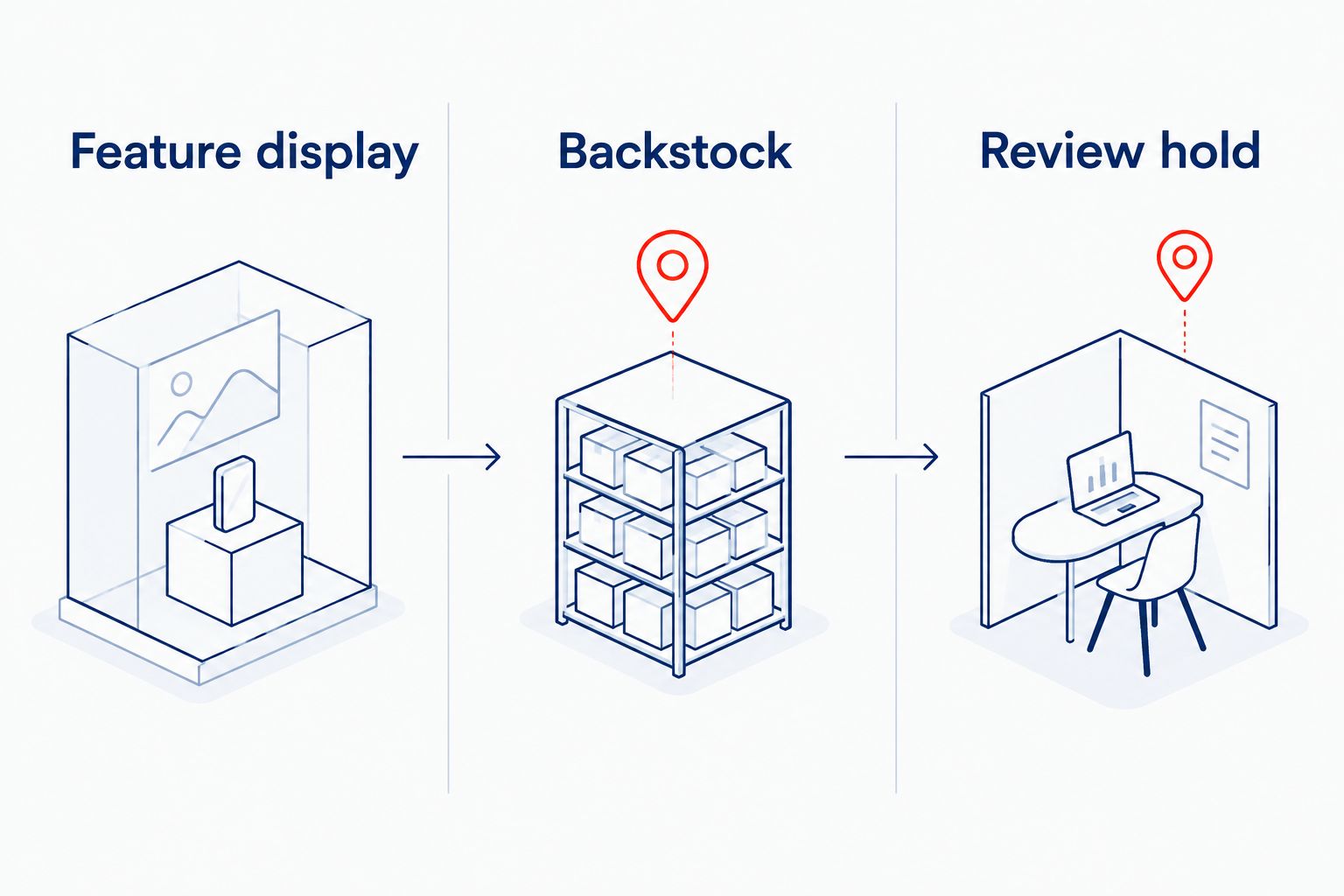
- Divide the working area into 3 zones: Feature display, Backstock, and Review hold. Keep unresolved goods in Review hold, away from items approved for sale.
- Put the designs for your chosen celebration in Feature display. Keep different roles or country designs in separate positions rather than mixing them into one unlabeled pile.
- Give each position a short location name. Record that name under Display location so another staff member can refill the correct position.
- Store the corresponding accepted goods in Backstock, grouped by the same retail identifiers. Keep the supplier mapping accessible to whoever handles replenishment.
- Walk through the display as a shopper. Check whether the occasion, exact role or design, and corresponding item are easy to match.
Expected result: Staff can move a specific design from backstock to its display position without rechecking the entire order.
Use the same three zone names in the worksheet and the physical workspace. Consistent labels make the handoff easier to follow without introducing a new system.
Label the celebration, then the design
- Add an occasion heading above the group, such as wedding party or birthday celebration. Use wording that accurately describes the items underneath it.
- Add a design-specific label at each position. For a wedding display, identify the family role rather than relying on the overall wedding heading.
- Use actual product photography if you add a visual reference. Do not substitute generic sunglasses photography that presents a different lens design.
- Check the display against the worksheet and retail records. Correct wording mismatches before opening the display to shoppers.
Expected result: A shopper can choose an occasion and identify the intended recipient without asking staff to decode the assortment.
The MOTHER OF THE GROOM Wedding Party Sunglasses illustrates why role labels matter. Keep that role distinct from FATHER OF THE BRIDE Wedding Party Sunglasses: both belong in a wedding display, but they identify different recipients.
The following real product photographs illustrate that distinction. They are retail catalog examples, not confirmation that either item appears in your Faire order.


Refresh the display whenever the occasion changes
The second workflow uses the same worksheet for a new celebration rather than rebuilding your records. For example, a 2026 wedding feature and a 2026 World Cup feature need different display groupings, but the receiving controls stay the same.
- Choose the next occasion and identify the accepted designs that match it. Do not change the underlying product identity to make an unrelated design fit.
- Count the goods leaving the feature display and reconcile them with your retail records. Keep previously accepted goods separate from unresolved returns or damaged items.
- Update Display location for each moved design. Replace the occasion heading and item labels together.
- Record customer requests by exact occasion, role, or country. A request for a different country is not evidence of demand for every flag design.
- Review actual sales and recorded requests before preparing another wholesale order. Carry the existing supplier-to-retail mapping into the next worksheet.
Expected result: The display changes while item identities and quantity records remain consistent.
Troubleshooting
The count matches, but the designs do not
Fix: Reconcile each item row against the order, not just the shipment total. Record the incorrect design separately, keep it in review hold, and report the mismatch with photographs and the order reference.
A pack was entered as an individual pair
Fix: Confirm the order's unit and pack contents, then correct the retail quantity through your system's documented adjustment process. Check related labels and records before staff continue replenishing the display.
Similar wedding roles keep getting mixed together
Fix: Give each role a separate position and matching backstock label. Use the complete role wording in the receiving record, even if the occasion heading simply says wedding party.
Staff cannot find the item at checkout
Fix: Test the identifier against the intended retail record. Resolve duplicate records or mismatched labels before replacing the item on display; do not rename several different designs to the same generic item.
The display does not match the retail count
Fix: Count the feature display and backstock separately, then check sales, receiving entries, transfers, and documented adjustments. Investigate the difference before changing the record to match a guessed quantity.
Customize your workflow
Keep the core handoff small: supplier item, retail item, accepted quantity, and display location. Add information only when someone will use it.
For a larger team, assign separate owners for receiving approval and display placement. For an event-focused shop, add a customer-request field that captures the celebration and exact design requested. Neither change requires an assumed Faire integration.
If you later connect software, verify its supported actions and quantity rules in the provider's current documentation. Test the handoff with a clearly identified item before applying it to the whole assortment. An automated quantity update still needs to preserve the correct design and selling unit.
FAQ
How do I turn Faire wholesale party sunglasses into a retail display?
Match each ordered design to a retail item, verify received quantities, and assign it to an occasion-led display. Keep a worksheet connecting the supplier item, accepted quantity, and physical location.
Can I assume Funglasses products are listed on Faire?
No. Confirm the seller identity and exact products in your Faire retailer account before ordering; a Funglasses retail catalog page does not establish a wholesale listing.
Do I need an automatic Faire inventory connection?
No. You can use a receiving worksheet and enter accepted quantities through your retail system's documented process. Verify supported actions before adding any software connection.
Should I display party sunglasses by occasion or mix every design together?
Use occasion-led groups, then separate the specific designs within each group. Wedding roles, birthday milestones, and country flags need labels that match their wording.
How do I avoid confusing wholesale packs with individual pairs?
Record the order unit and pack contents before ordering. Translate them into the selling unit your retail system uses, then reconcile quantities at receiving.
What should I do with incorrect or damaged sunglasses?
Keep unresolved items separate from accepted retail goods. Document the issue and order reference, then follow the supplier or platform's stated reporting process.
What product claims belong on party-sunglasses display labels?
Use the verified design name and occasion, plus any specifications explicitly supplied for that item. Do not add protective ratings or performance claims that the supplier has not provided.
One last thing
The frame is not the item identifier—the design is. Before finishing your 2026 setup, ask a staff member who did not receive the order to find a specific role or country design using only the worksheet and labels. Correct any ambiguous wording before expanding the display.


