


Instead of repeatedly sending sunglasses links to relatives and reconciling their replies, add wedding sunglasses as external gifts on your Zola registry and keep a separate favor tracker for recipients and orders. This guide shows you how to connect the two manually for your 2026 wedding without confusing a registry gift with an order for every guest.
- For zola registry sunglasses favors, use Zola’s external-gift workflow and a separate wedding favor tracker.
- Funglasses wedding sunglasses suit couples who want patterned-lens party accessories for celebration photos.
- Registry gift quantities and wedding guest counts answer different questions; track them separately.
- Verify the product link and purchase status before anyone places a second order.
Why this matters
A wedding registry tells friends and family what you would like to receive. A favor plan tells your wedding team what to hand out, to whom, and when. Connecting those plans does not make them the same list.
Funglasses specializes in graphic party sunglasses with patterned lenses, including wedding styles. Funglasses wedding sunglasses are best for couples who want statement-making accessories for group photos and celebrations. The trade-off is occasion specificity: a family-role design needs the right recipient, not an undifferentiated place in every welcome bag.
For a 2026 wedding, start with the purpose. Are you asking a relative to gift sunglasses for named family members, or arranging favors yourself for the reception? That decision determines what belongs on Zola and what belongs only in your planning sheet.
Before you start
- Registry access: Sign in to the Zola account that owns your registry. For the browser-based external-gift route, follow Zola’s instructions to install its Add to Zola browser button before opening the sunglasses page.
- Product and recipient details: Have the exact product page, intended recipient, wedding event, and delivery recipient ready. Keep your favor tracker in a document you and the designated order coordinator can edit.
- The gotcha: Adding an external gift is not an instruction to order favors for your whole guest list. Keep gift requests, confirmed purchases, and physical pairs received as separate records; do not assume one updates the others.
Use a desktop browser for the steps below so you can work between the product page, registry, and tracker. This is a manual workflow: you review each change before acting on it.
Choose your wedding sunglasses workflow
Best for named gifts: the external-gift route. Best for reception-wide favors: a couple-managed order. Both connect your sunglasses choice to wedding planning, but only the first needs a product entry on the registry.
| Workflow | Best for | Advantage | Limitation |
|---|---|---|---|
| External gift on Zola | A relative gifting a specific wedding-role accessory | Keeps the gift request alongside your other registry choices | Still requires purchase and receipt checks outside the favor tracker |
| Couple-managed favor order | Sunglasses distributed to wedding guests | Gives one coordinator control over designs and recipient counts | The couple manages ordering and distribution rather than treating each pair as a registry gift |
Choose the external-gift workflow when the item is something you genuinely want someone to give you. Choose the couple-managed workflow when sunglasses are part of your hosting plan. A wedding favor is a gift from you to your guests, not a purchase obligation for them.
Product selection and external-gift capture
- Open the exact wedding sunglasses page you want to request. Read the role wording carefully before copying or adding anything; mother of the bride and mother of the groom are different recipients.
- Decide who will receive the item. For a named family-role accessory, plan 1 pair per intended recipient rather than deriving the quantity from the entire wedding guest list.
- With the product page open, select your installed Add to Zola browser button. Follow the external-gift form it opens, checking the captured product identity and destination against the original page.
- Complete the addition only after the registry entry matches your intended item. Then open the entry from the registry and check that it leads back to the correct sunglasses page.
Expected result: Your registry contains the intended external gift, and its destination matches the product you selected. Your tracker still treats the item as requested, not ordered or received.
Do not replace an exact product link with the store homepage in the gift entry. A homepage leaves the gift giver to choose the role and design themselves, which defeats the point of requesting a specific wedding accessory.
Family-role choices for the registry
These two options make sense as individual family gifts rather than universal reception favors. Choose according to the person you are celebrating, not which side of the family has more guests.
| Wedding sunglasses | Best for | Why choose it | Planning limitation |
|---|---|---|---|
| MOTHER OF THE BRIDE Wedding Party Sunglasses | The mother of the bride’s celebration photos | The lens design names her wedding role | The wording does not suit a general guest favor |
| MOTHER OF THE GROOM Wedding Party Sunglasses | The mother of the groom’s celebration photos | The lens design names his mother’s wedding role | It needs a named recipient to prevent a mix-up |
Funglasses offers both role-specific designs with see-through patterned lenses. Choose the matching role for each recipient; keep general guest favors on a separate planning line.


Registry wording and gift ownership
- Write a short explanation wherever your registry allows you to describe the request. State the recipient and intended celebration, rather than describing it as a requirement for attending the wedding.
- Keep family-role accessories distinct. Do not combine different roles into an entry that sends everyone to a single product page.
- Assign 1 order coordinator in your private tracker. This person checks whether a gift has already been purchased before arranging another order.
- Record the delivery recipient privately. Confirm who will receive the package and bring the sunglasses to the wedding; do not put private delivery details in public-facing wording.
Expected result: A gift giver understands the request, and your wedding team knows who checks purchases and handles the handoff.
For a 2026 celebration, useful wording describes the purpose: a family accessory for wedding photos, a gift for a named person, or a reception favor you are arranging yourselves. Avoid wording that makes guests responsible for supplying your favor table.
Keep any event date in the private tracker too. A date helps the coordinator distinguish rehearsal-dinner accessories from reception favors without requiring the gift giver to understand your whole wedding schedule.
Favor tracker configuration
Create the following column labels yourself. These are suggested planning fields, not Zola interface labels: Recipient, Event, Product, Planned pairs, Gift status, Order status, Received pairs, and Coordinator.
- Add a row for each named recipient or clearly defined guest group. Use separate rows when the design, event, or responsible person differs.
- Enter the exact product title and intended pair count. Keep the registry entry reference in your private notes so you can compare the two records later.
- Set Gift status to describe the registry request, and Order status to describe the actual purchase. Do not use a single checkbox for both.
- Update Received pairs only after someone checks the physical package. Record who has the sunglasses and where they will be handed out.
Expected result: You can answer three different questions without guessing: what you requested, what someone ordered, and what your wedding team actually has.
A simple status sequence keeps the handoff clear: Requested, Confirmed, Received, then Distributed. Advance an item only when the responsible person verifies the next stage.
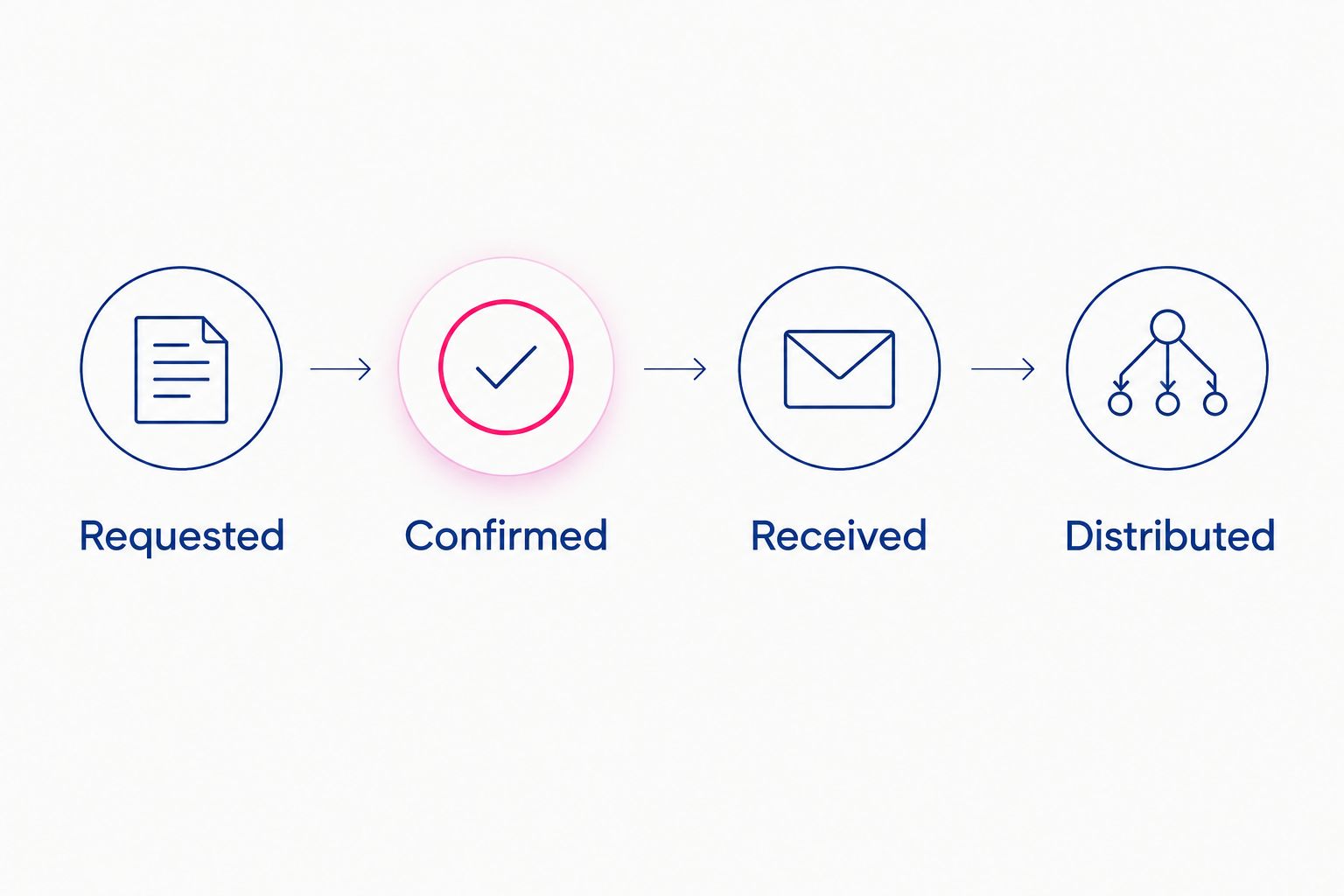
For your 2026 favor plan, count people who will receive sunglasses at the chosen event. Do not substitute invited households, registry visitors, or gift purchases for that recipient count.
Guest-view and order verification
- Open the guest-facing registry view, then inspect the sunglasses entry. Check the title, intended quantity, and destination without editing the entry at the same time.
- Follow the product link and confirm that the role wording matches. Return to the registry and check that your explanation makes sense without private planning notes.
- Run 2 checks before ordering: check the current gift record, then ask the coordinator whether anyone has already placed an order for that recipient.
- After a confirmed purchase, update the tracker and reconcile the registry record using Zola’s current instructions for external gifts. Keep the order confirmation in your private planning records.
Expected result: The public request and private order plan agree, and nobody orders a second pair because they mistook an unchanged tracker for an unpurchased gift.
Do not place a real test order to check the link. You can verify the destination by opening the product page. Purchase only after the coordinator has confirmed the request is still needed.
Update the favor plan whenever RSVPs change
For couple-managed favors, use confirmed attendance as the starting point for your recipient list. This adjacent workflow keeps the sunglasses plan current without turning every RSVP into a registry change.
- Review confirmed attendees for the event where you will distribute sunglasses.
- Compare that list with Recipient and Event in your tracker. Add newly confirmed recipients and remove people who will not attend that event.
- Recalculate Planned pairs from the revised recipient list. Keep named wedding-party accessories separate from general guest favors.
- Compare the new plan with confirmed orders and received pairs before taking another purchasing action.
Expected result: Your favor count follows the relevant attendance list, while individual registry gifts remain tied to their intended recipients.
For a 2026 wedding weekend, separate the rehearsal dinner, wedding reception, and afterparty if their guest lists differ. A person attending several events does not automatically need a fresh pair at each one; decide whether guests will keep and reuse their accessory.
Troubleshooting
The external-gift capture shows the wrong product
Return to the exact product page and compare it with the captured entry before completing the addition. Correct editable details where the form allows it; do not publish an entry that identifies a different wedding role.
The browser button does not open the capture form
Check that you are signed in and that the Add to Zola browser button is installed according to Zola’s instructions. If capture still fails, use Zola’s current help instructions rather than improvising a connection through an unrelated tool.
Someone purchased a gift, but your tracker still says requested
Ask the coordinator to verify the purchase with the gift giver or order record. Update Gift status and Order status separately, and leave Received pairs unchanged until the package is checked.
Your guest count and planned pairs disagree
Check whether you counted households instead of people, included attendees from a different event, or counted named family accessories twice. Rebuild the recipient list first; changing the registry quantity does not fix an incorrect favor count.
Nobody knows who is bringing the sunglasses
Name a delivery recipient and event-day coordinator in the tracker. Record the handoff location before packing, so a confirmed order does not remain at someone’s home during the wedding photos.
Customize your workflow
Once the basic connection works, organize sunglasses by the moment you want to use them: family portraits, welcome bags, reception photos, or the send-off. Assign a named person to each handoff and keep role-specific accessories apart from general guest items.
Funglasses party sunglasses give you occasion-specific choices, but the planning benefit comes from matching each choice to a person and a moment. Start with the photo or favor handoff, then choose the design. That keeps the registry from becoming a collection of accessories with no distribution plan.
For a 2026 wedding, keep the final packing list separate from the public registry. The packing list should identify the physical pairs, their recipients, and the person carrying them—not simply repeat what was requested online.
FAQ
How do I connect Zola registry sunglasses favors?
Use Zola’s external-gift workflow to add the chosen sunglasses product, then maintain a separate favor tracker for recipients, orders, and received pairs. Verify the registry link before sharing the request.
Does adding sunglasses to Zola place an order?
Adding a sunglasses gift to your registry is not the same as placing an order. Track an actual purchase separately and verify receipt before treating the pair as ready for the wedding.
Should wedding favors go on our registry?
Use the registry for sunglasses you genuinely want to receive as gifts; manage favors you are giving guests in your own order plan. Do not make buying wedding favors a condition of attendance.
What are Funglasses wedding sunglasses best for?
Funglasses wedding sunglasses are best for couples seeking graphic, patterned-lens accessories for celebration photos. Role-specific designs need named recipients rather than a general guest allocation.
How many sunglasses should I request for a named family member?
Plan 1 pair per intended recipient for a named family-role accessory. Keep that request separate from sunglasses planned for the wider guest list.
Can I update sunglasses favor counts when RSVPs change?
Yes, update your private favor tracker when attendance changes for the event where you will distribute sunglasses. Compare the revised recipient count with confirmed orders and received pairs before ordering more.
How do I prevent duplicate sunglasses purchases?
Assign 1 coordinator to check the registry record and confirmed orders before another purchase. Keep requested, ordered, and received statuses separate so an incomplete update does not trigger a duplicate order.
One last thing
The handoff matters more than the registry entry on wedding day. Put named family accessories in clearly labeled recipient bags, and give the coordinator a packing list that identifies who gets each pair and when.
A perfectly linked gift still misses the photo if nobody brings it. Finish your setup by assigning the carrier, not by adding another registry item!


