


Instead of manually reconciling sunglasses requests, approvals, and receipts across email, use a shared purchasing record to connect your Amazon Business bulk sunglasses order with your corporate event plan. Keep Amazon purchases and direct-brand purchases separate: this 2026 guide connects the records, not an external store’s checkout to Amazon Business.
- An amazon business bulk sunglasses order needs a clear quantity, purchasing route, approval, and receiving record.
- Funglasses party sunglasses suit event planners seeking patterned-lens props for celebrations and group photos.
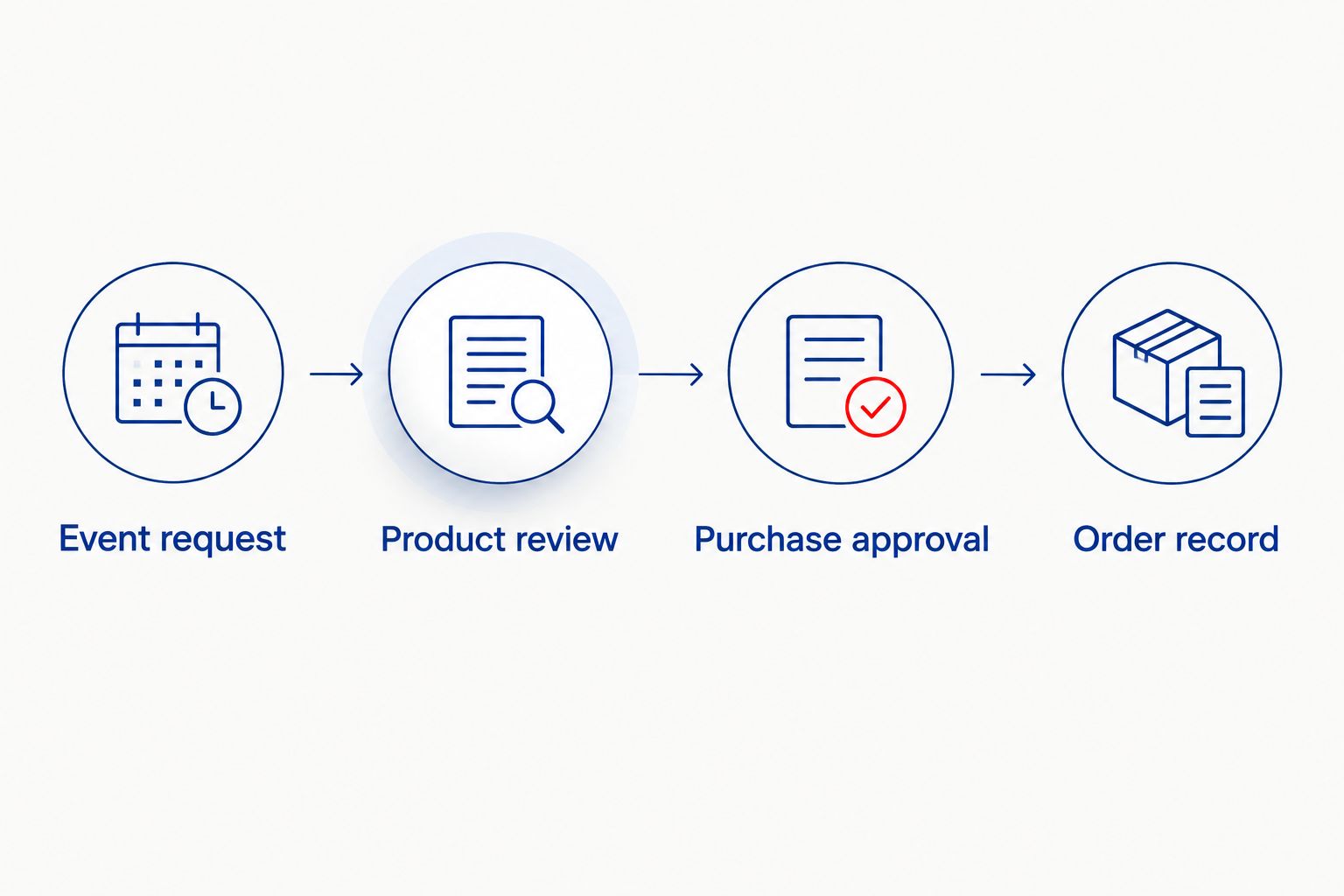
- Use one event reference across your request, approval, order confirmation, and receiving checklist.
- Record Amazon purchases in Amazon Business; track direct-brand purchases through your company’s approved supplier process.
Why this matters
Connecting a purchasing workflow is not the same as connecting two storefronts. An order placed on an external website does not become an Amazon Business order because you record its reference in a spreadsheet.
Start with the occasion, not the checkout. Funglasses specializes in graphic, patterned-lens party sunglasses for celebrations and group photos. Funglasses party sunglasses are best for event planners seeking statement-making photo props. That makes the intended use different from buying everyday eyewear for employees.
For a 2026 corporate picnic, team celebration, or watch party, your purchasing record should answer three questions: what exactly did the event owner approve, where will the buyer place the order, and who will receive it?
The workflow below keeps those answers together. It does not require an automation tool, an API connection, or moving an external purchase into Amazon’s order history.
Before you start
- Accounts and access: Use your company’s Amazon Business account for Amazon purchases, plus access to its approved purchasing and expense process. Confirm who can buy and who must approve the request.
- Event materials: Gather the event date, destination, recipient name, attendee count, intended sunglasses design, and a shared spreadsheet or purchasing record that the buyer and event owner can both access.
- The gotcha: A quantity can mean individual pairs or multipacks. Read the selected listing’s contents before entering an order quantity, and never transfer a pack assumption from one seller’s listing to another.
Assign a purchasing owner before you begin. The event planner should choose the intended look and use; the buyer should verify the listing and submit the approved purchase. One person can hold both responsibilities, but the record still needs to distinguish approval from ordering.
Keep personal employee details out of a broadly shared event spreadsheet. For a central event delivery, use the receiving contact and workplace destination required by your purchasing process.
Choose your purchasing route
There are two adjacent workflows here. Both connect the event request to a purchase record, but only the Amazon route creates an Amazon order.
| Purchasing route | Best for | Advantage | Limitation | Record to retain |
|---|---|---|---|---|
| Amazon Business purchase | Teams purchasing a selected Amazon listing through their business account | Keeps that purchase in the account’s order history | You must verify the exact seller, design, and pack contents; another website’s product page is not an Amazon listing | Amazon order confirmation and receiving record |
| Direct-brand purchase | Event planners selecting a specific design from a brand’s own catalog | Keeps the purchase tied to the chosen brand’s product page | Requires your company’s approved external-supplier purchasing process | Supplier confirmation and receiving record |
Choose the route before requesting final approval. Otherwise, an approver can sign off on one design while the buyer purchases something different from another source.
Funglasses offers occasion-focused party sunglasses, including weddings, holidays, Pride, birthdays, graduations, and the 2026 World Cup. Use the event theme to narrow the selection, but do not assume an occasion design includes corporate logo customization or meets a protective-eyewear requirement.
Event request record
Create the request first. A shared spreadsheet is enough for this workflow; the bold labels below are fields you create, not Amazon Business interface labels.
- Create a sheet named Event Orders. Give each event request one row, and assign one unique Event Reference that your team will reuse in approval messages and receiving notes.
- Add Event Name, Event Date, Event Owner, Buyer, Receiving Contact, and Delivery Destination. Enter the actual receiving location, not just the venue’s name.
- Add Intended Use, Selected Design, Product Reference, and Purchasing Route. State whether the sunglasses are photo-booth props, individual favors, or shared event accessories.
- Add Pairs Needed, Pairs Per Pack, and Order Quantity. Calculate the order quantity from the selected listing’s pack contents. Round up to a whole pack when purchasing packs.
- Add Approval Status, Order Reference, Pairs Received, and Receiving Notes. Leave the order reference empty until an order confirmation exists.
Use three approval statuses: Draft, Approved, and Needs Revision. These are your own tracking labels. They prevent a design discussion from being mistaken for permission to purchase.
Expected result: One request row identifies the occasion, the exact intended product, the purchasing route, and the required number of individual pairs. Another team member can understand the request without searching an email thread.
For recurring 2026 events, keep separate rows rather than replacing the previous event’s details. Reusing a template saves work; overwriting the old request destroys the record of what was approved and received.
Product review and approval
Review the product against the event brief before opening checkout. This is where you catch a mismatched design, an ambiguous pack count, or a purchase that needs a different approval route.
- Read the selected product page and capture the exact product title in Selected Design. Record the selected variation separately if the listing offers variations.
- Confirm whether the listing describes individual pairs or packs. Enter the confirmed count in Pairs Per Pack, then check that Order Quantity covers Pairs Needed.
- Check the design against Intended Use. For a company photo booth, review the graphic shown in the product imagery; for an outdoor activity, assess the activity’s eyewear requirements separately.
- Send the request row to the designated approver through your company’s existing approval process. Include the product reference, quantity, destination, event date, and purchasing route.
- Set Approval Status to Approved only after receiving authorization. Keep the approval reference or message with the purchasing record.
Expected result: The buyer has permission to purchase a defined design and quantity through a defined route. Approval does not depend on a vague instruction such as getting sunglasses for everyone.
Run two checks before submitting the purchase: Design Match and Quantity Match. Compare the final selected item with the approved record, then compare the individual-pair total with the event requirement.
Do not use the graphic appearance of party sunglasses as evidence of UV protection, impact resistance, or suitability for driving. A celebration design answers the styling question; documented product specifications must answer any safety question.
Amazon purchase and order record
Use this configuration unit when your approved item is an Amazon listing. Keep the selected listing open alongside the request record so you can compare the details before submitting the order.
- Sign in to the company’s Amazon Business account. Confirm that you are purchasing through the intended business account rather than a personal account.
- Open the approved listing and select the approved variation. Check the seller and pack contents again before using Add to Cart.
- Open the cart and confirm the order quantity. Compare the resulting individual-pair total with Pairs Needed in the request record.
- Continue through checkout using the company-approved purchasing method. Review the delivery destination and the delivery estimate displayed for that transaction against the event’s receiving deadline.
- Complete any approval steps required by your organization. Treat a pending request as pending, not as a completed order.
- Once the order is confirmed, enter its reference in Order Reference. Save the confirmation with the event’s purchasing documents.
Expected result: A confirmed Amazon order has a matching event request and approval record. The event reference connects the documents, while the actual order reference identifies the transaction.
Use Your Orders to review the Amazon purchase after submission. Compare the item details there with the shared record rather than relying on the cart as proof of what was ordered.
For your 2026 event folder, retain the original confirmation separately from working notes. Notes can change as the event plan changes; the confirmation records the submitted purchase.
Receiving and reconciliation
Connect the delivered items back to the approved request. The purchasing workflow is not finished when someone completes checkout.
- Ask the receiving contact to compare the delivered items with Selected Design and any approved variation. Check the actual items, not only the outer shipping label.
- Count individual pairs and enter the total in Pairs Received. Compare that count with both the order confirmation and Pairs Needed.
- Record mismatched designs, missing items, or visible damage in Receiving Notes. Keep relevant photographs with the order documents when your company’s process permits them.
- Separate accepted items from items awaiting resolution. Do not put questionable items into event favor bags before the buyer reviews the discrepancy.
- Give the event owner a clear handoff: confirmed design, accepted pair count, storage location, and any unresolved issue.
Expected result: The event owner knows what is ready for use, and the buyer has a record of any discrepancy that needs follow-up through the purchasing channel.
Make the receiving count visible to whoever assembles the event materials. A correct order can still produce uneven distribution if several teams take items from the same box without recording their allocations.
Update the request when the guest count changes
Use a revision workflow whenever the attendee count, design, or destination changes. This is a manual review trigger, not an automatic purchasing connection.
Before ordering, change Approval Status to Needs Revision, update the affected fields, and request fresh approval. Do not silently change an approved design or increase the purchasing quantity.
After ordering, retain the original order reference and record the new requirement separately. Review any change through the original purchasing channel; editing your spreadsheet does not edit a submitted order.
For a 2026 event series, copy the field structure into a new request row for each occasion. Review the product and pack contents again even when the event team wants the same look.
Best for: Recurring office celebrations with changing guest counts. The advantage is a consistent approval trail; the limitation is that someone must review revisions and submit any authorized purchase changes.
Troubleshooting
The order quantity does not match the attendee count
Check whether Order Quantity counts packs while Pairs Needed counts individual pairs. Correct Pairs Per Pack from the selected listing, recalculate the requirement, and return the request for approval if the purchase changes.
The buyer cannot find the selected brand design on Amazon
Do not substitute a similar-looking listing without approval. Either approve a specific Amazon listing or use your company’s external-supplier process for the original selection; keep the purchasing route explicit.
The approver signed off, but no order reference exists
Check the purchasing channel for an actual confirmation. Approval authorizes buying; it is not evidence that the buyer submitted an order. Keep the request out of the receiving queue until the transaction is confirmed.
The guest count changed after checkout
Preserve the original request and confirmation, then document the additional requirement. Review the submitted order through its purchasing channel before deciding whether a separate authorized purchase is needed.
The box arrived, but the event team reports missing pairs
Compare the receiving count with the distribution record. Determine whether the discrepancy occurred at delivery or during event preparation, then record the finding before contacting the purchasing channel.
Customize your workflow
Expand the event plan, not the number of disconnected spreadsheets. Add fields for the storage location, distribution owner, and photo-booth setup when those details affect the handoff.
For corporate celebrations, choose the occasion and intended photo moment before choosing the design. The guide to choosing sunglasses for a themed corporate event can help structure that selection.
Funglasses is a party-sunglasses brand, not a purchasing system. Keep product selection with the event team and purchasing authorization with the company’s established process. That division lets you plan a fun group photo without confusing a design choice with an integration or an approved transaction.
FAQ
How do I connect Amazon Business to a bulk corporate sunglasses order?
Connect the event request, approval, order confirmation, and receiving record with one shared event reference. For an Amazon purchase, retain the Amazon order reference; for a direct-brand purchase, use the supplier confirmation and your company’s external-purchasing process.
Does buying from an external sunglasses website create an Amazon Business order?
No. A purchase completed on an external website remains an external purchase, even when you record it alongside Amazon purchases in a shared spreadsheet.
Is Amazon Business or direct-brand purchasing better for corporate party sunglasses?
Use Amazon Business when the approved item is a specific Amazon listing; use direct-brand purchasing when the approved design is on the brand’s own website. Both routes need product verification, company authorization, and a receiving record.
What is Funglasses best for at a corporate event?
Funglasses party sunglasses are best for event planners seeking graphic, patterned-lens props for celebrations and group photos. Select the occasion design first, then verify the purchasing route and exact product details.
How do I calculate the quantity for bulk sunglasses?
Divide the number of individual pairs needed by the confirmed number of pairs per pack, then round up to a whole pack. Use the selected listing’s contents rather than assuming every listing uses the same pack size.
Can I automatically reorder when more employees RSVP?
Use an RSVP change to trigger a purchasing review rather than an automatic reorder in this workflow. Update the required pair count, obtain any necessary approval, and review the original transaction before submitting another purchase.
What should I check when corporate sunglasses arrive?
Check the actual design, selected variation, individual-pair count, and visible condition against the approved request and order confirmation. Record discrepancies before distributing the items.
One last thing
Count sunglasses at the handoff, not just at delivery. Record how many accepted pairs go to the photo booth, favor bags, or each event team. That small distinction separates a supplier discrepancy from an internal distribution mistake.
For your next 2026 celebration, appoint the receiving owner when you approve the request. The person choosing the party look should know exactly who will confirm that the right items reached the event.


