


Instead of manually rebuilding every corporate swag order, connect paid Shopify subscription orders to an approval queue so each recurring sunglasses box gets checked before packing. This 2026 guide explains the merchant-side setup; buying from Funglasses does not itself establish a subscription or an automated supplier connection.
- Build your corporate sunglasses subscription box around paid Shopify orders, an approval queue, and confirmed fulfillment instructions.
- Funglasses party sunglasses are best for corporate planners choosing patterned-lens props for celebrations and group photos.
- Keep recurring billing separate from supplier purchasing; Shopify orders do not authorize purchases from another store.
- Approve the occasion, quantity, and destination before releasing each recurring corporate swag box.
Why this matters
A recurring charge is not a complete swag brief. Your subscription handles the repeat purchase, but your team still needs to know which celebration the box supports, who receives it, and whether the previous selection still fits.
Funglasses party sunglasses are best for corporate planners choosing patterned-lens props for celebrations and group photos. The brand specializes in novelty party sunglasses, with collections covering weddings, holidays, milestones, Pride, and the 2026 World Cup. That occasion-led range supports themed planning; it does not establish a managed corporate subscription service.
Treat this as a workflow for a Shopify store you control. If you are a corporate buyer without merchant access, use the approval-queue approach for procurement instead of trying to install subscriptions on someone else's store.
The important split is simple: Shopify manages your customer order; your purchasing and fulfillment process manages the sunglasses. Keep those responsibilities separate until you have an explicit supplier arrangement.
Before you start
- Merchant access: Have permission to manage Products, Orders, and Apps in your Shopify store. Use a subscription app that supports your intended recurring purchase model, and confirm that Shopify Flow is usable in your store before choosing the Flow route below.
- A fulfillment brief: Prepare the approved product selection, purchasing authorization, packing instructions, destination, and an owner for exceptions. Confirm any permission needed to use supplier photography or copy in your own storefront.
- The setup gotcha: A subscription app controls renewal behavior; a general paid-order trigger does not automatically distinguish subscriptions from ordinary purchases. Establish a reliable recurring-box identifier before building the automation, and do not assume that an order in your store creates an order with Funglasses.
Decide who has authority to approve changes. The person organizing the celebration and the person releasing a shipment need a shared record, not separate email threads with competing instructions.
For your 2026 setup, start with 1 destination per order and 1 accountable approver per box as operating rules. These are recommended constraints, not platform limits; they make the first workflow easier to verify.
Choose the recurring workflow
Choose the workflow around what stays consistent between boxes. A fixed selection and an occasion-led selection need different controls, even when both use recurring billing.
| Workflow | Best for | Advantage | Limitation | Required control |
|---|---|---|---|---|
| Fixed recurring box | Teams repeating an approved selection | Fewer selection decisions between cycles | The same theme does not fit every celebration | Reconfirm quantity and destination |
| Occasion-led recurring box | Event planners changing themes between cycles | Selection follows the actual celebration | Every change needs a fresh packing brief | Approve the theme before fulfillment |
| Recurring procurement reminder | Corporate buyers without their own merchant store | Creates a repeatable purchasing routine without managing subscriptions | Does not create a customer subscription contract | Authorize each supplier purchase |
Use a fixed recurring box only when the contents really should repeat. For an occasion-led corporate sunglasses subscription box, keep the billing schedule predictable and the product-selection approval explicit.
Funglasses fits the occasion-selection part of that process. Its patterned-lens party sunglasses give planners a celebration-specific choice, but the buyer still needs to arrange recurring administration, purchasing, and fulfillment.
Subscription product configuration
This unit establishes what the customer subscribes to. Do not begin with automation: begin with a product offer that your team can actually fulfill.
- Open Products in Shopify and select the product that represents your recurring corporate swag box. Use a clear customer-facing description that explains what repeats and what requires a new selection.
- Open your subscription app through Apps. Configure its recurring purchase arrangement using that app's documented settings; the field names and renewal controls depend on the app you install.
- Define the interval, eligible product or variants, and the customer's change process. Keep any promised contents consistent with your actual sourcing and packing arrangement.
- Create an internal mapping between the subscription product or variant and the recurring-box workflow. Use a stable product or variant identifier rather than relying on a title that your team edits.
- Document who purchases the sunglasses and who packs the box. If you buy from a separate retailer, leave purchasing as an authorized task unless you have a supported supplier connection.
Expected result: Your store has a subscription product with a documented renewal arrangement and an identifiable recurring-box line item. Your fulfillment team can explain what an order means without guessing.
Avoid presenting a changing assortment as a guaranteed fixed product. If the customer chooses each occasion, make that selection process part of the operating brief rather than silently carrying the previous theme forward.
Before accepting live subscriptions, check the subscription app's documented checkout and renewal behavior. An initial checkout test does not prove that a renewal produces the same order information your automation needs.
Paid-order routing configuration
Use a paid order as the starting point for the packing review. A subscription creation event alone is not evidence that a particular renewal has been paid.
- Open Shopify Flow through Apps and choose Create workflow. Select Order paid as the trigger.
- Add a condition that checks for your recurring-box product or variant in the order. Use the identifier established in the previous unit; do not route every paid order into the swag queue.
- Add Add order tags and apply a distinct internal tag such as
swag-review-required. This is a suggested tag you create, not a built-in subscription status. - Add Send internal email to notify the named approver. Include the order reference and instructions to review the order in Shopify; avoid copying employee address lists into the notification.
- Enable the workflow only after checking its condition and recipient. Confirm that the subscription app's renewal orders satisfy the same product or variant condition.
Expected result: A qualifying paid order receives your review tag, and the approver receives a notification. A regular paid order outside the recurring-box selection stays outside the queue.
This routing step creates a review task, not a shipment instruction. Tell your warehouse or packing partner that tagged orders remain unapproved until the separate fulfillment decision is recorded.
An order tag is a label, not a fulfillment hold. If another system releases orders automatically, configure a supported hold or release control in that system. Otherwise, your approval queue and automatic fulfillment run independently.
Approval and fulfillment configuration
The approval record turns a paid recurring order into a usable packing brief. Keep the decision attached to the order rather than hidden in a conversation.
- Open Orders and locate the tagged order. Check the subscription-box line item, quantity, payment status, and shipping destination against the approved corporate brief.
- Confirm Occasion, Quantity, and Destination with the organizer. These are your review labels, not claimed Shopify interface fields.
- Record the exact selected product and variant in your internal brief. Do not use a vague instruction such as same party glasses when the theme changes between cycles.
- Record Approval with the approver's name and the decision. Resolve exceptions before authorizing a supplier purchase or releasing packing instructions.
- Complete Packing according to your actual fulfillment arrangement, then update the Shopify order through your normal fulfillment process. Remove or replace the review tag according to your documented procedure.
Expected result: Every released box has an approved occasion, a confirmed quantity, a confirmed destination, and a product selection that the packer can identify.
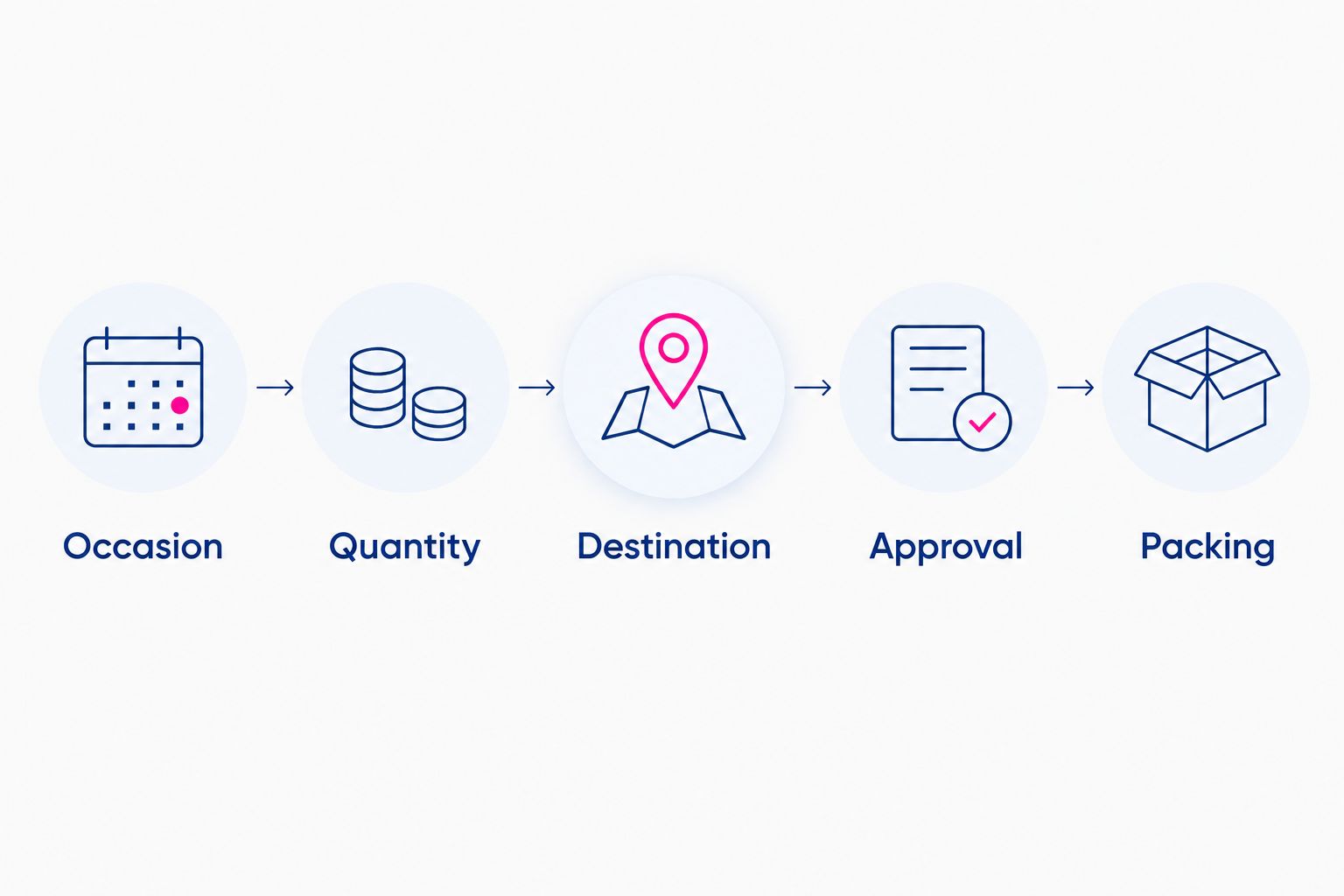
Keep sunglasses selection practical. Choose an occasion that matches the event, and do not describe novelty party sunglasses as protective eyewear without documented specifications.
For a 2026 World Cup office celebration, confirm whether the organizer wants a country-specific theme before selecting flag designs. Do not infer employee preferences from office location, nationality, or a previous event.
Renewal test configuration
Test the routing and the release process separately. A notification arriving successfully does not prove that an unapproved order stays out of packing.
- Use the subscription app's documented test process to check initial purchase and renewal behavior. Keep test activity out of real purchasing and fulfillment.
- Run 3 test cases as a minimum operating checklist: a qualifying paid box order, an unrelated paid order, and a qualifying order with an unresolved destination.
- Confirm that only the qualifying orders enter the review queue. Check the order tag and the internal notification against the same order reference.
- Confirm that the unresolved-destination case cannot pass your approval procedure. Verify the actual warehouse release control rather than assuming the review tag blocks it.
- Repeat the review notification for the same order during testing. Make sure your team records only one packing authorization for that order reference.
Expected result: Your workflow recognizes the correct orders, rejects unrelated purchases, and leaves incomplete boxes unapproved.
Save the results with your operating instructions. For the 2026 launch, use those results to establish the starting procedure; repeat the checks whenever you change subscription apps, routing conditions, or fulfillment systems.
Update the next box when the occasion changes
A second useful workflow handles changes between renewals. It suits corporate planners who keep a recurring program but rotate the celebration.
Use an organizer-submitted event update to create a review task, not to rewrite paid orders automatically. Your intake form or internal planning record should identify the subscription, intended cycle, requested theme, quantity, and destination.
- Ask the organizer to identify the intended future box explicitly. Do not accept an ambiguous instruction such as change the next one without matching it to a cycle.
- Compare the request with the subscription app's current order and renewal records. Decide whether it affects a future cycle or an order already created.
- Update future subscription details through the app's supported controls. Review an existing order separately through the relevant order process.
- Record the accepted change and notify the approver responsible for that cycle. Keep the previous brief as history rather than overwriting the only record.
Expected result: An occasion change reaches the correct box, and an already-created order does not silently inherit unrelated future instructions.
Changing a planning record is not the same as changing a subscription contract. Confirm both sides before promising the organizer that the update is complete.
Troubleshooting
Ordinary orders enter the swag queue
Your condition is too broad. Replace a general customer or payment check with the recurring-box product or variant identifier, then retest an unrelated order.
Renewals do not receive the review tag
Inspect the actual renewal order and compare its line items with the routing condition. Confirm that the order reaches the paid state and that the subscription app creates the order information your condition expects.
The same box receives duplicate packing instructions
Use the Shopify order reference as the packing authorization key. Before releasing a box, check whether that order already has an approval and fulfillment instruction; repeated notifications must not create repeated supplier purchases.
The organizer changed the address, but the order did not
Check the subscription record and the existing order separately. Apply the correction through the supported process for each affected record, and pause your internal release procedure until the destination is confirmed.
Packing starts before approval
Your fulfillment system is not following the review queue. Configure its supported release control or switch to a documented manual release process; adding another tag does not fix an independent automatic shipment rule.
Customize your workflow
Expand the process by event type before adding more automation. Start with separate briefs for office celebrations, summer gatherings, and employee milestones, while keeping the same approval checkpoints.
For occasion selection, use the guide to choosing sunglasses for a themed corporate event. Keep the selected theme in the order brief so your buying and packing teams work from the same instruction.
For your 2026 event calendar, assign each box an organizer and a purpose. A photo-booth box needs an event brief; a recurring employee gift needs a recipient brief. Neither should rely on the subscription schedule to explain the occasion.
FAQ
How do I set up a corporate sunglasses subscription box with Shopify?
Create a subscription product in a Shopify store you control, then route qualifying paid orders into an approval queue. Confirm the occasion, quantity, destination, and selected sunglasses before authorizing purchasing or packing.
Does Funglasses offer the Shopify subscription service described here?
This guide describes a merchant-managed workflow, not a Funglasses subscription offer. Funglasses supplies novelty party sunglasses; recurring billing and fulfillment administration require a separate arrangement.
Can Shopify automatically order sunglasses from another retailer?
A paid order in your Shopify store does not itself place an order with another retailer. Use an authorized purchasing step unless you have an explicitly supported supplier connection.
What is the best workflow for corporate boxes with changing themes?
An occasion-led approval workflow is best when each box supports a different celebration. Keep recurring billing separate from the decision about what goes into that cycle's box.
Does a Shopify order tag stop a box from shipping?
An order tag does not itself stop fulfillment. Use your fulfillment system's supported hold or release control, or a documented manual release procedure.
Can I change the sunglasses after a renewal order is created?
Review the existing order separately from future subscription changes. Use the supported controls in your subscription and order systems, and confirm the updated packing brief before release.
What should I test before starting recurring corporate swag orders?
Test a qualifying paid box order, an unrelated paid order, and a box with an unresolved destination. Also verify that repeated notifications cannot authorize duplicate packing or purchasing.
One last thing
Automate the reminder before you automate the purchase. A recurring schedule tells you when to act, but an approved occasion tells you what to send. Keep that distinction in your 2026 operating plan, and your team gets a repeatable process without losing control of the celebration.


